

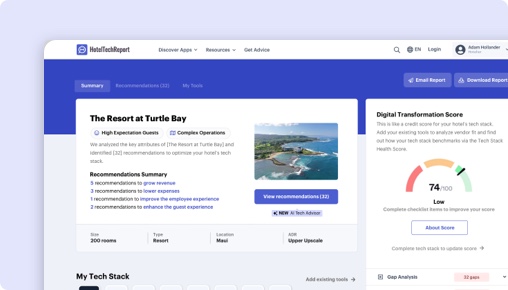
Sorry, this functionality is only available for verified hoteliers
The project dashboard is a free tool that is only available to verified hoteliers to make adopting new technology easier by streamlining their research and simplifying their communication workflow.

Click Maint vs. hub OS Maintenance:
Which Is Right for You?

TLDR
We analyzed 281 verified hotelier reviews, compared feature sets, pricing, and real-world case studies to break down where each platform delivers. The right choice depends on your property type and priorities:
Click Maint stands out with exclusive features like Inventory Trend Analysis.
hub OS shines in centralized communication across housekeeping, maintenance, and front office — especially for RV park properties (5.0/5).
How Does Click Maint Compare to hub OS Maintenance?
Side-by-side ratings based on 281 verified hotelier reviews on HTR.
| HTScore |
|
|
| Likelihood to Recommend |
|
|
| Ease of Use |
|
|
| Customer Support |
|
|
| Value for Money |
|
|
| Starting Price | From $200/mo | From $300/mo |
| Verified Reviews | 5 | 276 |
What Are the Pros and Cons of Click Maint vs hub OS Maintenance?
After analyzing 281 verified reviews, Click Maint users most value its , while hub OS users highlight centralized communication across housekeeping, maintenance, and front office, reporting, history, and analytics, real-time work order and fault tracking. Click any theme to see what reviewers say.
|
Click Maint
|
hub OS
|
|---|---|
| Pros | |
|
+
Centralized communication across housekeeping, maintenance, and front office
▾
|
|
|
+
Reporting, history, and analytics
▾
|
|
|
+
Real-time work order and fault tracking
▾
|
|
|
+
Preventive maintenance scheduling and checklists
▾
|
|
| Cons | |
|
−
Workflow flexibility and customization
▾
|
|
|
−
Task prioritization, postponement, and approval controls
▾
|
|
Click Maint vs hub OS: Rankings by Hotel Segment
How each product ranks among Hotel Maintenance Software vendors for different property sizes, types, and regions — based on verified reviews from hoteliers in each segment.
By Hotel Size
| Segment |
Click Maint
|
hub OS
|
|---|---|---|
| Small (10-24 rooms) ▾ | — | #4 15 reviews |
| Mid-Size (25-74 rooms) ▾ | #10 3 reviews | #4 106 reviews |
| Large (75-199 rooms) ▾ | #11 1 reviews | #3 69 reviews |
| X-Large (200+ rooms) | #10 1 reviews | #6 4 reviews |
By Property Type
| Segment |
Click Maint
|
hub OS
|
|---|---|---|
| Boutique ▾ | #10 4 reviews | #3 94 reviews |
| Luxury ▾ | — | #4 73 reviews |
| Branded / Chain ▾ | #10 3 reviews | #6 84 reviews |
| Extended Stay ▾ | — | #6 11 reviews |
By Region
| Segment |
Click Maint
|
hub OS
|
|---|---|---|
| North America ▾ | #10 5 reviews | #8 10 reviews |
| Europe ▾ | — | #3 159 reviews |
| Asia Pacific | — | #4 3 reviews |
| Middle East ▾ | — | #3 6 reviews |
Is Click Maint or hub OS Better for Hotels?
Click Maint and hub OS both target hotel maintenance management but diverge significantly in scale, maturity, and feature depth. Click Maint, launched in 2023 with 12 employees, is a newer, simpler solution emphasizing ease of use, affordability, and mobile-first access. Its user base is mostly boutique hotels, supported by 5 reviews averaging 4.5/5. In contrast, hub OS, founded in 2015 with 60 employees, serves a broader hotel segment including branded, city center, luxury, and resort properties, backed by 276 reviews averaging 4.7/5 overall and 4.5/5 in the last six months.
Both products solve the core problem of managing maintenance requests, work orders, preventive maintenance, and asset tracking in hotels. They enable faster issue resolution, reduce downtime, and improve guest readiness through mobile apps and real-time communication. However, hub OS offers deeper integration with hotel departments and a larger ecosystem, addressing complex workflows at scale, while Click Maint prioritizes simplicity and quick implementation suited to smaller or less complex properties.
Click Maint vs hub OS: Which Should Your Hotel Choose?
If your hotel is a small to mid-sized boutique property or a limited-service hotel prioritizing straightforward, easy-to-use maintenance software with rapid team adoption, Click Maint is the better fit. This is supported by its 4.8/5 ease-of-use rating across 5 reviews and reviewer praise highlighting simple training and mobile access for all staff. However, this data is limited and lacks extensive segment diversity.
If you run a branded, city center, luxury, or resort property with complex maintenance needs, multiple departments, and a desire for integrated workflows across housekeeping and front desk, hub OS is better supported. Its 276 reviews with consistent 4.7/5 ratings across segments such as branded hotels (116 reviews), city center hotels (117 reviews), and luxury hotels (94 reviews) demonstrate broad adoption. Reviewers emphasize real-time notifications, task prioritization, asset tracking via QR codes, and compliance features, critical for larger properties.
For hotel types with fewer than 10 reviews (e.g., extended stay, motels using hub OS), the data is less conclusive, so operator discretion is advised.
Is Click Maint or hub OS Easier to Use?
Both products earn an identical 4.8/5 ease-of-use rating. Reviewers of Click Maint highlight its straightforward mobile and web interfaces, describing it as “the most user friendly CMMS system I ever used,” and praise easy staff training and involvement. The app’s simplicity supports quick adoption by maintenance teams without steep learning curves.
hub OS users also find the system easy to understand and operate, especially valuing mobile app usability for diverse teams including older staff. One reviewer noted, “Easy to understand for everyone involved,” and highlighted straightforward decision-making and follow-up. Some hub OS users want improvements in website navigation for maintenance departments but confirm the mobile experience is positive.
Onboarding ratings are nearly identical (Click Maint 4.8/5, hub OS 4.7/5), with no reviewer concerns about ramp-up time on either side.
Edge: Even.
Which Has Better Features: Click Maint or hub OS?
hub OS and Click Maint share 9 core maintenance features, including work order management, preventive maintenance scheduling, inspections, and mobile access. Click Maint offers one unique feature hub OS lacks: Inventory Trend Analysis, which helps track inventory consumption trends and supports more strategic purchasing decisions. This can be helpful for hotels seeking basic inventory insights alongside maintenance.
hub OS, however, provides a more comprehensive feature set for hotel-specific workflows. It includes real-time fault reporting with photos, QR code asset identification, automated escalation for critical issues, multi-department integration (housekeeping, front desk, guest experience), and compliance management for mandatory inspections. These features enhance operational control and reduce communication silos, especially valuable in larger or branded hotels.
Although Click Maint focuses on simplicity, hub OS’s richer feature set supports complex maintenance operations, proactive issue prevention, and operational transparency. The absence of equivalent customization and integration capabilities in Click Maint limits its suitability for hotels needing advanced workflows.
Edge: hub OS.
Which Has Better Customer Support: Click Maint or hub OS?
Customer support ratings are close: Click Maint scores a perfect 5/5 but based on only 5 reviews, while hub OS averages 4.7/5 across 276 reviews. Both products receive high onboarding satisfaction (4.8 vs 4.7).
Reviewers of Click Maint commend the team as supportive and responsive, emphasizing ease of training and user involvement. hub OS users also praise responsive service, noting “availability and service” and “fluid and close relationship” with the vendor. Some hub OS users mention the need for faster development of requested enhancements but confirm support is attentive.
Given the volume and consistency of hub OS reviews, its support rating carries more weight, though neither product raises concerns about poor service.
Edge: Even.
Which Has More Integrations: Click Maint or hub OS?
hub OS offers 24 verified integrations with hotel technology partners, including Oracle Hospitality, Mews, Infor, and Signify, which support broader hotel operations beyond maintenance. These integrations enable data sharing and cohesive workflows across PMS, housekeeping, and other departments.
Click Maint has no verified integrations currently. This limits its ability to connect with existing hotel systems and centralize operations.
For hotels needing integration with PMS or other platforms to improve cross-department coordination and data visibility, hub OS is clearly advantageous.
Edge: hub OS.
Which Do Hoteliers Rate Higher: Click Maint or hub OS?
Both products have high overall ratings but differ in review volume and recency. hub OS maintains a 4.7/5 overall from 276 reviews, with 4.5/5 in the last six months from 87 recent reviews, demonstrating stable satisfaction. Click Maint holds 4.5/5 from 5 reviews, with 2 recent reviews too few for a reliable current rating.
Segment ratings favor hub OS across most hotel types with at least 5 reviews. For boutique hotels, Click Maint scores 4.5/5 (4 reviews) versus hub OS’s 4.7/5 (106 reviews). In branded hotels, hub OS’s 4.7/5 rating based on 116 reviews surpasses Click Maint’s 4.5/5 from 3 reviews. For resorts, hub OS (4.7/5, 77 reviews) slightly outpaces Click Maint (4.5/5, 3 reviews).
Click Maint’s limited review count means its ratings are less representative. hub OS’s broad, recent, and stable rating data gives a more reliable picture of user satisfaction.
Edge: Even.
How Much Do Click Maint and hub OS Cost?
Click Maint starts at a base price of $200.00 with no additional implementation fees, monthly flat fees, or per-room charges. Pricing is simple and transparent but lacks a free trial.
hub OS’s base price is higher at $300.00, also without implementation fees or per-room pricing. Like Click Maint, hub OS does not offer a trial period.
The $100 difference could be relevant for budget-conscious smaller hotels, but hub OS’s richer feature set and integrations justify the premium for larger or complex operations.
What Type of Hotel Should Use Click Maint?
- Hotels that prioritize quick, easy-to-use maintenance software with minimal training, supported by 4.8/5 ease-of-use ratings.
- Boutique and limited-service hotels, which make up 60% and 40% of Click Maint’s user base respectively.
- Teams that require straightforward mobile access to submit and manage work orders without complexity.
- Properties with simple maintenance needs that do not require integration with PMS or other hotel systems.
- Hotels seeking an affordable, no-frills solution with transparent pricing starting at $200/month.
Not ideal if:
- Your property demands integration with other hotel systems like Oracle Hospitality or Mews.
- You need advanced preventive maintenance workflows, asset tracking with QR codes, or multi-department coordination.
- You operate multiple properties requiring unified profiles or complex customization.
- Your team requires extensive reporting and inventory management beyond basic trend analysis.
What Type of Hotel Should Use hub OS?
- Branded, city center, luxury, and resort hotels with complex maintenance workflows and larger teams.
- Hotels that benefit from integrated communication across housekeeping, front desk, and guest experience departments.
- Properties seeking real-time fault reporting with photos, automatic escalation, and compliance tracking.
- Hotels requiring extensive asset management with QR code scanning and detailed maintenance history.
- Operators who prioritize data-driven decision making with detailed reporting and analytics.
Not ideal if:
- Your property is small or operates with limited maintenance complexity and prefers a simpler, more affordable solution.
- You require rapid onboarding without customization or adapting workflows to software.
- You need a no-frills CMMS without integrations or extensive features.
Click Maint vs hub OS: The Bottom Line for Hotels
The core difference between Click Maint and hub OS lies in scale and sophistication. Click Maint is a newer, simpler, and more affordable CMMS focused on ease of use and quick implementation for smaller or boutique hotels. hub OS is a mature, feature-rich platform designed to integrate maintenance with hotel operations at scale, favored by a broad range of hotel types including branded and luxury properties.
Choose Click Maint if you seek a straightforward, mobile-first maintenance tool with easy staff adoption and an inventory trend feature, supported by 4.8/5 ease-of-use ratings and a $200 starting price. It fits boutique and limited-service hotels with limited integration needs.
Choose hub OS if your hotel requires complex preventive maintenance planning, real-time multi-department communication, asset tracking with QR codes, and strong integration with hotel systems like Oracle Hospitality and Mews. Its 4.7/5 overall rating across 276 reviews and 24 integrations make it suited for branded, city center, luxury, and resort hotels that need comprehensive operational control.
How Much Do Click Maint and hub OS Maintenance Cost?
Hotel Maintenance Software pricing is rarely straightforward. Here is what we know from each vendor's public pricing data. Always request a custom quote for your property size.
|
Click Maint
|
hub OS
|
|
|---|---|---|
| Starting Price | From $200/mo | From $300/mo |
Feature Comparison: Click Maint vs hub OS Maintenance
These are the features each vendor has configured, organized by feature group — the same data shown in the vendor dashboard. Expand a group to compare features side by side.
| Feature |
Click Maint
|
hub OS
|
|---|---|---|
|
▾
Asset Preservation
|
|
|
| Pool Chemical Readings | ||
| Preventative Maintenance Plan Mapping | ||
| CapEX Budgeting & Forecasting | ||
|
▾
Inspections & Checklists
|
|
|
| Custom Inspections | ||
| Asset Maintenance Logs | ||
|
▾
Messaging & Communication
|
|
|
| Notifications | ||
| Mobile App | ||
|
▾
Task Management
|
|
|
| Recurring Tasks | ||
| Work Orders & Ticketing | ||
|
▾
Workflow Automation
|
|
|
| Recurring Tasks | ||
| Preventative Maintenance Plan Mapping | ||
| Work Orders & Ticketing | ||
|
▾
Analytics & Reporting
|
|
|
| Inventory Trend Analysis | ||
| Asset Maintenance Logs | ||
| CapEX Budgeting & Forecasting |
Click Maint vs hub OS: The Bottom Line
Unique capabilities
What hoteliers love
A major theme is that Hub OS brings multiple departments into one shared workflow, so everyone can see room status, requests, and completion updates.... A major theme is that Hub OS brings multiple departments into one shared workflow, so everyone can see room status, requests, and completion updates. Reviewers say this reduces phone calls, improves accountability, and creates a clearer handoff between housekeeping, maintenance, and reception. Hotels see this as a way to keep rooms guest-ready and improve service coordination.
Hub OS is frequently valued for giving hotels a usable history of room and maintenance activity, plus reports that support oversight and planning. Use... Hub OS is frequently valued for giving hotels a usable history of room and maintenance activity, plus reports that support oversight and planning. Users like having failures, inspections, and maintenance records in one place, but several want better filtering, export, dashboard flexibility, and easier access to historical issues. For hotel managers, stronger analytics would improve decision-making and productivity tracking.
Users frequently say Hub OS speeds up maintenance by letting staff report, receive, and follow repairs in real time. This improves response times, red... Users frequently say Hub OS speeds up maintenance by letting staff report, receive, and follow repairs in real time. This improves response times, reduces duplicate chasing, and helps teams coordinate faster across departments. In hotel operations, that means fewer unresolved room issues and quicker room turnover.
Where hoteliers push back
A recurring theme is that Hub OS works well out of the box but needs more flexibility for hotel-specific workflows. Reviewers ask for better customiza... A recurring theme is that Hub OS works well out of the box but needs more flexibility for hotel-specific workflows. Reviewers ask for better customization of labels, reports, dashboards, checklists, task types, permissions, and room-specific processes. The ability to adapt the system more easily would help hotels fit the software to their operational structure instead of changing their procedures to match the tool.
Several reviewers want stronger controls around task priority, postponing work, and deciding who can approve or cancel requests. They say these functi... Several reviewers want stronger controls around task priority, postponing work, and deciding who can approve or cancel requests. They say these functions matter for managing urgent repairs versus lower-priority work and for avoiding unnecessary rework. Better control here would help maintenance managers protect service levels and keep schedules realistic.
Ranks higher for
Frequently Asked Questions About Click Maint vs hub OS Maintenance
Can Click Maint replace hub OS Maintenance?
It depends on your requirements. Click Maint and hub OS Maintenance share many core Hotel Maintenance Software features, but each has unique capabilities. Click Maint offers 0 verified integration partners, while hub OS Maintenance offers 24. Review the feature comparison above to see where they differ before switching.
Which is better for small or independent hotels?
Small hotels should prioritize ease of use and fast onboarding. Click Maint leads in ease of use at 4.8/5 vs 4.8/5. Look for transparent pricing and a trial or demo option. Filter reviews on each product page by property size to hear from hotels like yours.
Do Click Maint or hub OS Maintenance offer a free plan?
Click Maint: No. hub OS Maintenance: No. Neither product currently offers a free tier. Most Hotel Maintenance Software vendors offer demos or trials — request one from each to evaluate before committing.
How Does HTR Evaluate and Rank Click Maint and hub OS Maintenance?
The HT Score is a composite ranking that considers 4 criteria groups and over a dozen variables to help hoteliers objectively compare hotel technology products. Click Maint has an HT Score of 0 and hub OS has 94. Here is how the score is calculated.
| Criteria Group | Weight | What It Measures |
|---|---|---|
| Customer Ratings & Reviews |
|
How highly do users recommend this product? Ratings Score, Review Volume, Share of Voice, Review Depth, Review Recency, Success Stories ▾ The most heavily weighted factor. Analyzes average satisfaction ratings (likelihood to recommend, ease of use, support, ROI), total review count relative to category peers, review recency (at least 20 reviews in the trailing 6 months), and share of voice across unique hotel clients to detect selection bias. |
| Partner Ecosystem |
|
How highly do tech partners recommend this company? Partner Recommendations, Integration Quantity, Integration Quality ▾ Evaluates partner recommendations as expert votes of confidence, the number of verified integrations, and ecosystem quality — the average HT Scores of integration partners. Products with higher-quality integration ecosystems are more likely to deliver a connected tech stack. |
| Customer Centricity |
|
How customer-centric is this organization? Certified Support, Review Consistency, Profile Completeness ▾ Assesses whether the company has earned HTR Customer Support Certification, maintains consistent review collection over time (an indicator of feedback-driven culture), and keeps product profiles complete with capabilities, screenshots, pricing, and features. |
| Reach, Staying Power & Resources |
|
How extensive is this company's reach and resourcing? Geographic Reach, Staying Power, Company Resources, Trending Score ▾ Measures global presence (countries and regions served), years in business as a stability proxy, team headcount as a resource proxy, and a trending score based on trailing-twelve-month buyer inquiries, reviews, partner recommendations, and press activity. |
Customer ratings and reviews are by far the most important factor in the HT Score algorithm. HTR does not accept payment for higher rankings. All reviews are verified — only hotel industry practitioners with confirmed affiliations can submit ratings. View full HT Score methodology →
What Other Hotel Maintenance Software Comparisons Are Hoteliers Reading?
Explore more head-to-head comparisons based on verified hotelier reviews.


Contents
Get Your Free AI Analyst Report
Custom recommendations tailored to your property


Let´s lookup your hotel information
Still weighing your hotel maintenance software options?
A few popular systems from our hotel maintenance software guide — or let our AI score each one against your specific property in about two minutes.

